OBD2 Scanner
The advice here is intended for Skoda Enyaq and Elroq. The information is also applicable for other MEB cars, e.g. VW ID3, ID4, ID5, ID7, Audi Q4 E-tron, Cupra Born and Tavascan, and MEB based Ford Explorer and Capri. It may also be useful as general information for other EVs.
OBD2 Intro
OBD2 (also written as OBDII) is a data protocol used in EVs and ICE cars to provide diagnostic data about motor, control systems etc.. It is based on CAN bus messages. CAN (Controller Area Network) bus is a standard for network cable and communication for car components.
The OBD2 messages have a standard structure, but there is little standard for the content of the messages. Each car model or car platform has their own system for coding data in the messages. All MEB cars use the same OBD2 message system.
OBD2 is also used by repair shops to read error and status messages reported by the car. This simplifies finding faults in the car.
The OBD2 port in Enyaq is under the dashboard, on the left side, about 20 cm below the light buttons.
Practical Usage
For MEB cars OBD2 has detailed data for temperature of battery, SOC, power to motor, heat and cooling system, etc..
All MEB cars use the same coding for messages. So the software app to read the OBD2 messages is the same for all MEB cars.
To use OBD2 you need:
- OBD2 dongle with Bluetooth
- Mobile app to read and display OBD2 data
OBD2 Dongle
There are lots of OBD2 dongle models from many companies to choose from. Many will work with common available software but there is no guarantee. Look for a model with ELM327 compatibility and read reviews.
VGate is one company that makes several OBD2 dongle models. E.g. VLinker FS and ICar Pro. For use with an Android phone or tablet select a model with Bluetooth 3 or 4.
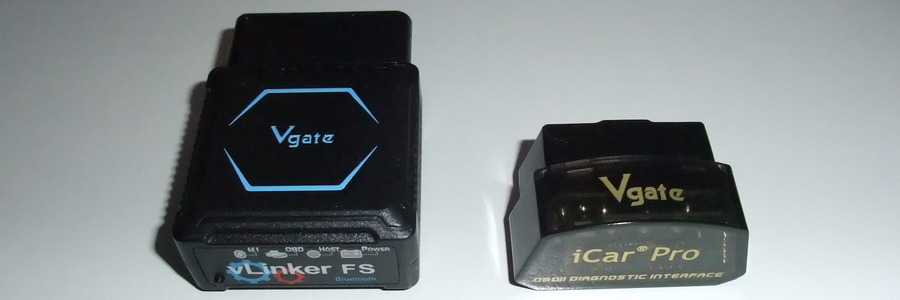
VLinker FS
- ~6 cm tall. When inserted in the Enyaq OBD2 port it sticks
out ~4cm below dashboard. It has fast communication with Android phone.
The dongle can be kept inserted at all times. It has an auto sleep function after 30 mn.
of no activity. It will auto wake up whenever Enyaq is started.
Price ~60 €. Recommended.
ICar Pro BLE 4.0
- It is small and is out of view when inserted into
the OBD2 socket. Fast communication with Android phone.
The device has a sleep function after 30 mn of no activity.
However a negative point is that it can NOT wake up just by
starting the Enyaq. You have to pull out the device and re-insert
it into OBD2 port.
There is an auto wake up, but it only works on ICE cars where
it senses the ignition process.
Price ~30 €. Less recommended for Enyaq.
Mobile App
There are several Android apps that can be used. A good choice
is Car Scanner
that has good support for MEB EVs. The app can be used for
free with adverts at bottom of screen. An advert free version
called Car Scanner Pro costs ~5 €.
Connection and Setup
With Enyaq started up, insert OBD2 dongle and it will light up its LEDs. On the mobile phone initiate Bluetooth scanning and connect to the OBD2 device.
Start CarScanner app. Click icon settings. In settings menu, click "Adapter OBDII ELM327". Click device name to select OBD2 device. In settings menu, click "Connection profile" and select Skoda, then select "EV MEB: ID.3, ID.4 ...". In settings menu, click Units and select "Metric (km/h, km)".
Back on main menu at bottom of screen click blue button Connect.
After ~15s connection to OBD2 should be running.
On main menu click icon Dashboard. Data screen 1 opens.
There are 28 screens (2025-08) with different dashboard data of Enyaq.
Some screens are more useful than others. Useful screens:
- 1: Practical driving info and battery temperature
- 6: State of high voltage battery
- 12: Compare voltage of battery cells
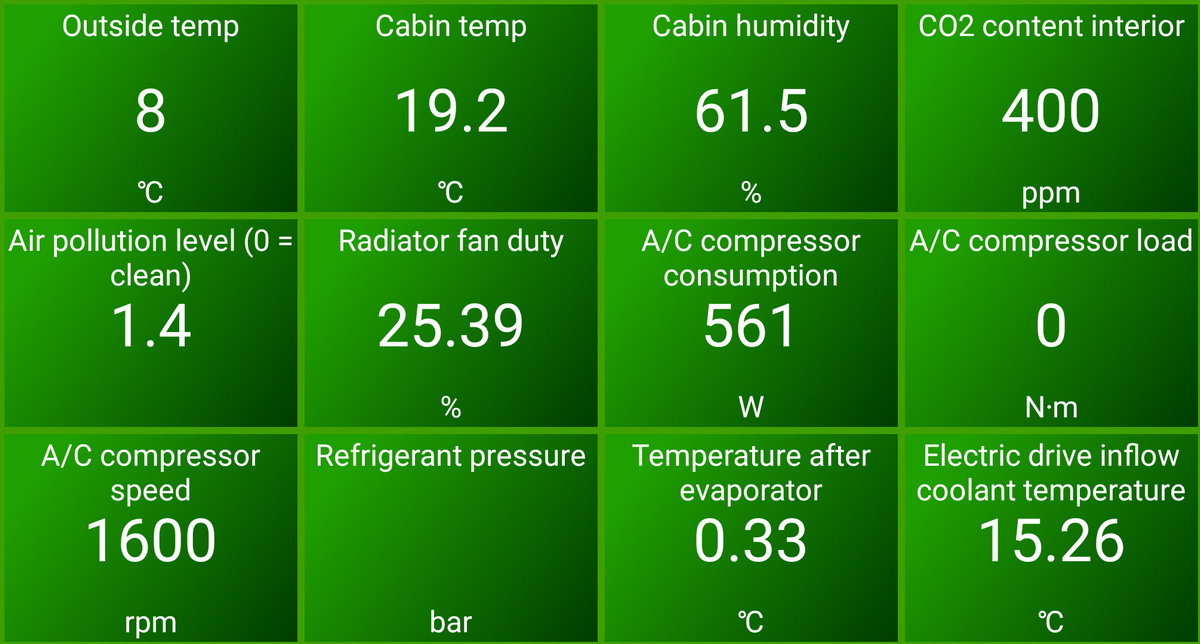
- 15: Temperature and airco. info
Screen 1
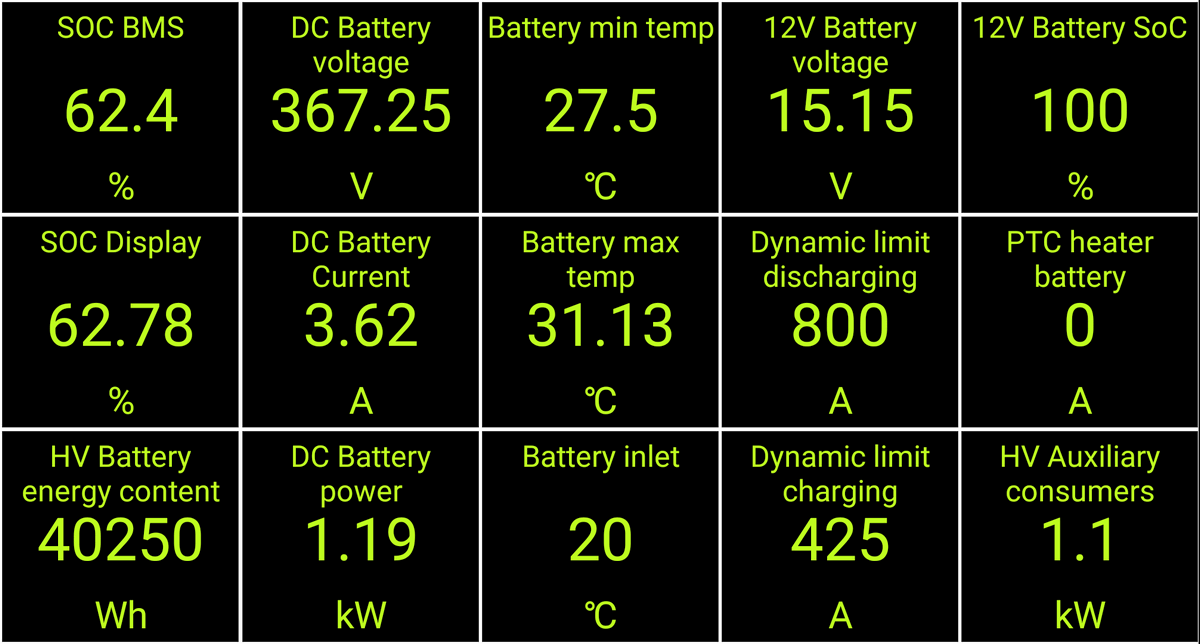
Practical info about (high voltage) battery temperature and max charging speed.
Battery min temp. Lowest battery module temperature.
To charge fast at a DC charger
this should be >=25°C.
Battery max temp. Highest battery module temperature.
It is normally max 5°C above "Battery min temp". If it is
higher there might be a problem with one or more battery modules.
Battery inlet temperature where power cable connects to complete
battery pack. On a cold day it can be well below "Battery min
temp". The temperature here has no impact on charging speed.
DC Battery power rate of power used (positive kW) or charged
(negative kW). For Enyaq 80X power consumption can go up to ~210 kW where
motors will deliver up to 195 kW.
Dynamic limit charging states max amperes for charging. It
depends on battery temperature and how low SOC. For Enyaq 80X
(2023, APP310 RWD) max is 425 A. With a max charging voltage
of 408 V: 408 V * 425 A = 173 kW. Note: During charging the car
will also consume power for running cooling fan, heating,
infotainment and lights.
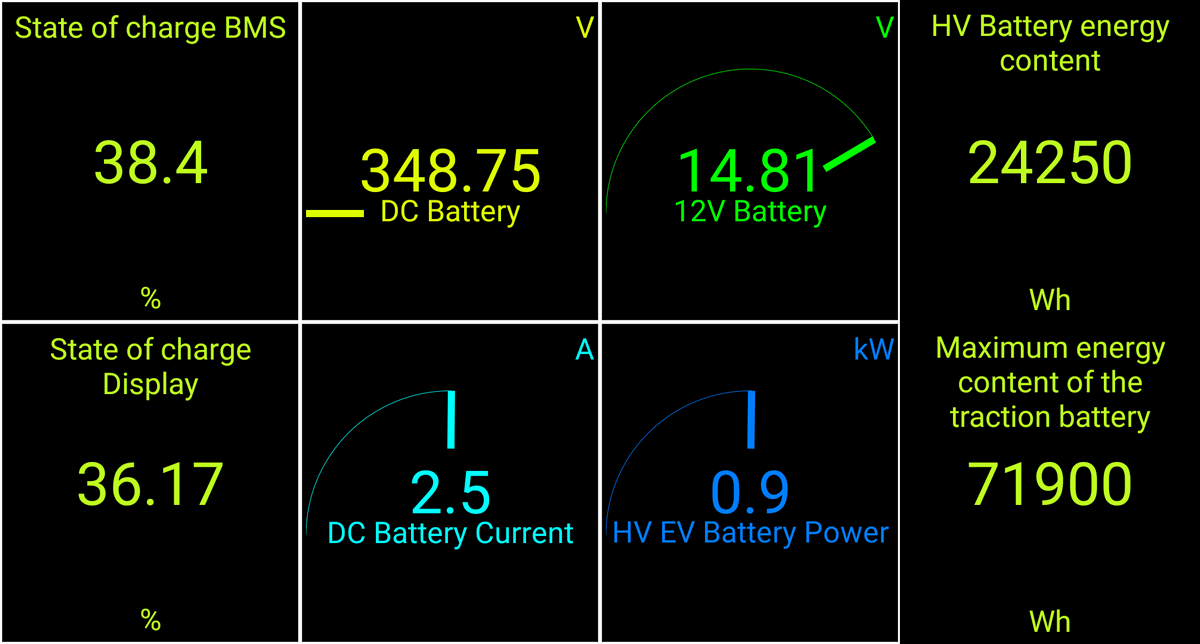
Screen 6
Maximum energy content of the traction battery. Wh in (high voltage) battery when charged to 100% of user available capacity. The capacity here depend on the temperature and aging of the battery. For a new Enyaq with 77 kWh battery should here state 77000 Wh. Charge to 100% SOC before reading this value. It is unclear how precise this data point is to determine aging of battery.
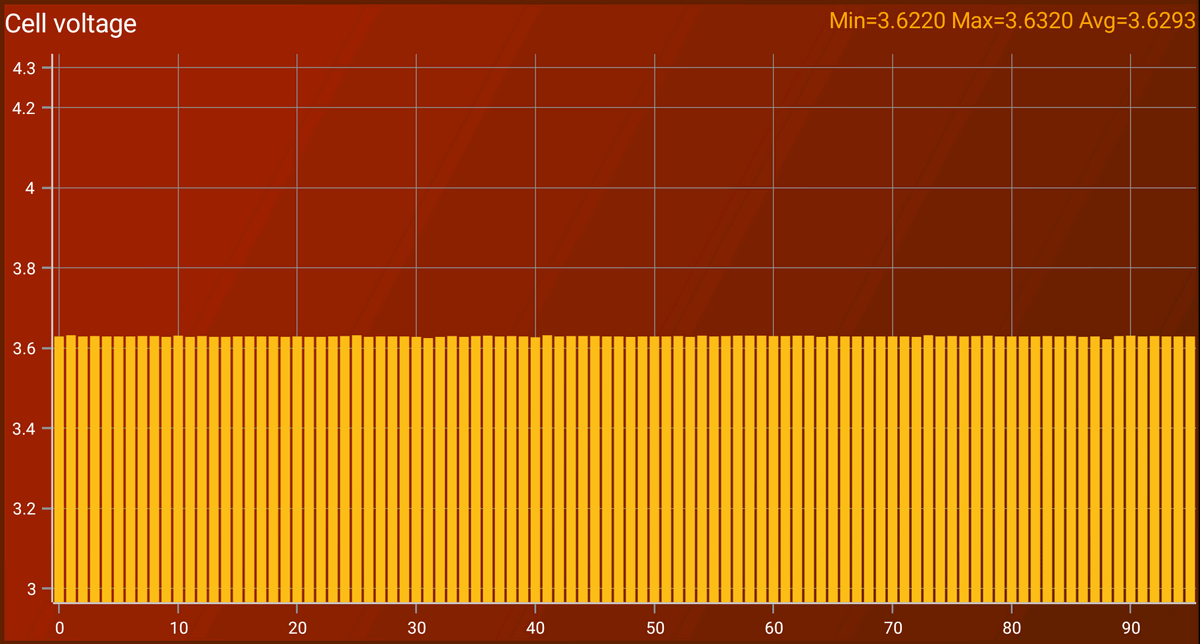
Screen 12
Cell voltage. Graph of all battery cell bundles. In a (netto) 77 kWh battery there are 96 bundles in series (96 bars in the graph). For a well working battery the 96 bundles should have exactly same voltage (and hence same charge). However due to imperfection in chemistry and production, small voltage variations might develop as battery age. In the example here there is a tiny variation of 10 mV = 0.010 V, not a problem. If there is a persistant variation of >50 mV contact a service center. When a charge is completed the BMS (Battery Management System) can balance the bundles that are too low or too high by charging or discharging a specific bundle. When this actually takes place is currently unknown. It might happen when charging to 100% SOC, but could as well be done at end of charging to some other %SOC.
Screen 15
Cabin temp. Inside temperature.
Cabin humidity. If high humidity it is recommended to increase heating to drive out moisture.
Car Alarm
When you stop and leave the car e.g. at a charging stop, remember to disconnect in the Car Scanner app.
If you do not, you can walk away out of the Bluetooth range, perhaps 20-30 m without problem. However the Car Scanner will continue to attempt to reconnect to the OBD2 dongle Bluetooth.
When you walk towards the car again the Car Scanner app will suddenly succeed to reconnect to the OBD2 dongle and that will wake up the device that then tries to communicate in CAN network of the car. This unexpected communication when car is locked triggers the alarm.
If this happens use your key fob to open then close car to stop the car alarm.
Tags: EV, Enyaq, OBD2
Page link: <http://foersom.org/EV/Skoda/Enyaq/OBD2Scan.html>
Edited: 2025-12-29